Managing Your Organization
Change CSS File Path
The Organization Management page allows to associate your CSS file with the layout. Changing the CSS File Path enables you to change any and all graphically related items.
Show eCheck Options
You can Show eCheck Options. If you select this, users will be required to select a payment type of either credit card or eCheck.
Disable Luhn Check
You can Disable Luhn Check. If you are processing eCheck accounts or non-standard credit card types (e.g., private label or stored value cards), you must disable the Luhn check.
Prevent Tokenization on Invalid Card Numbers
The Prevent Tokenization on Invalid Card Numbers configuration option is Enabled by default for new Organizations created after July 23, 2015. See the following table for functionality details.
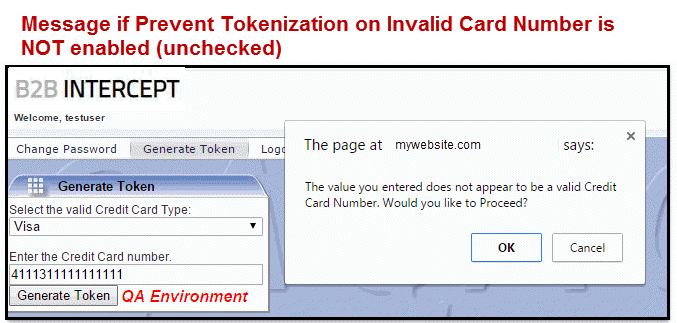
If this checkbox is disabled (unchecked) but Luhn check is enabled and the user enters an invalid card number:
-
A message displays indicating the card number is invalid
-
He/she can select OK and continue with obtaining a token for the invalid card number.
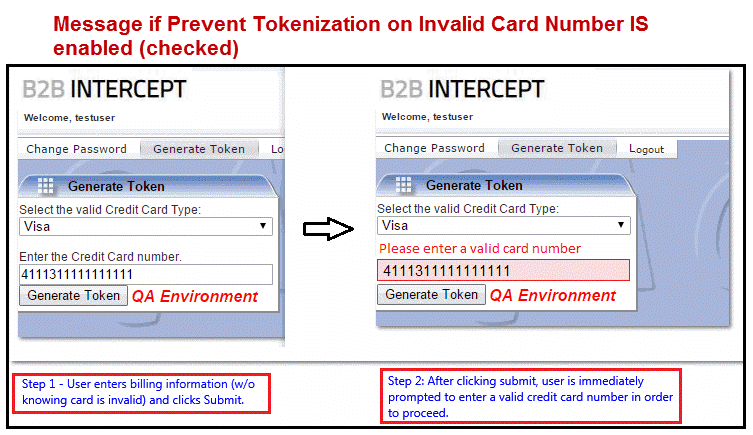
If this checkbox is enabled (checked) and the user enters an invalid card number, the card number field is highlighted with a message indicating to "Please enter a valid card number".
Show Card Type
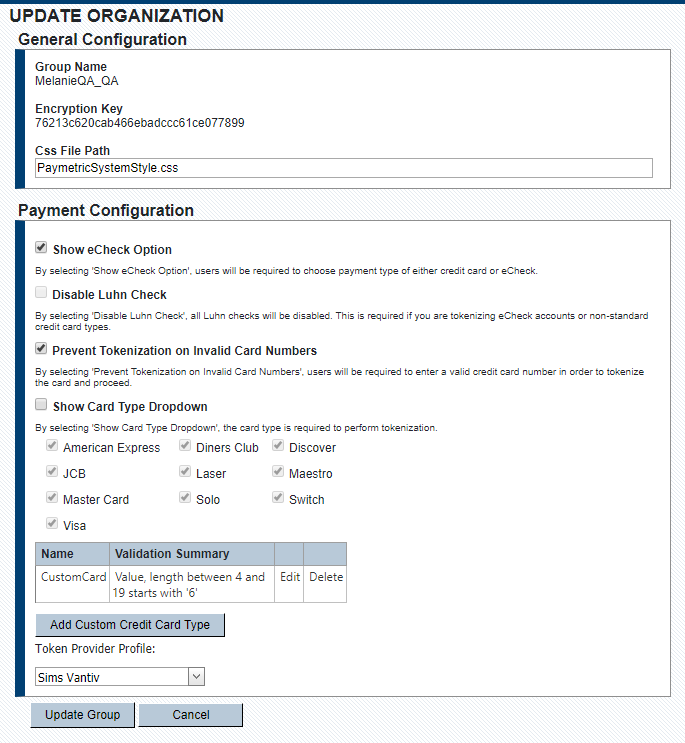
You also have the ability to Show Card Type Dropdown box on the Generate Token page for your users. You can select from the list of supported Card Types, custom card type(s), and/or Token Provider Profile.
Add Custom Card Type
-
Select Show Card Type drop-down.
-
Click Add Custom Credit Card Type.
-
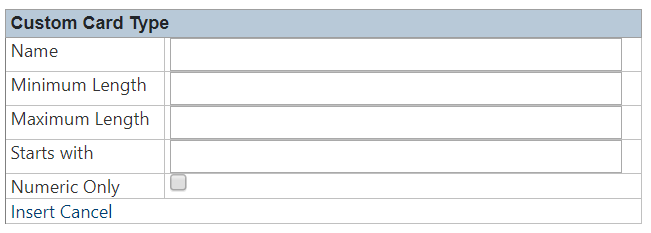
Complete the following fields to add validations for your custom card type:
-
Name – The name that displays in the Card Type dropdown.
-
Minimum Length – Minimum length the of the card number for the custom card type.
-
Maximum Length – Maximum length the of the card number for the custom card type.
-
Starts with – The value that the card number must start with for the custom card type.
-
Numeric Only – Select this checkbox if you want to enforce numeric values only in the card number field.
-
-
If you have implemented Credential Management Platform (CMP), then select a Token Provider Profile from the dropdown.
-
Click Insert to add the new card type.
-
(Optional) Click Edit to edit an existing custom card.
-
(Optional) Click Delete to delete an existing card.
-
Click Update Group to commit the changes.