Documents with Payment Card Information
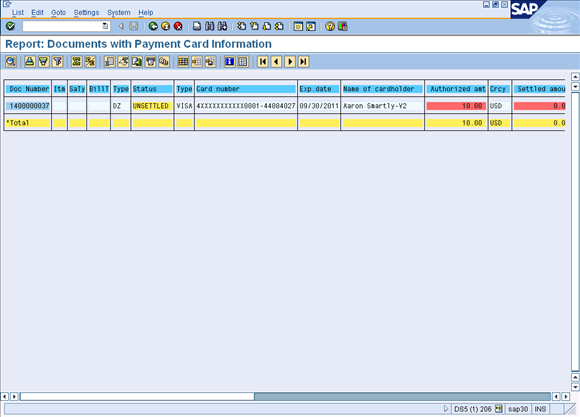
This report will display all order, billing, and accounting documents containing the payment card information entered on the selection screen. This report is useful in quickly finding documents related to a specific card number and can assist in answering customer service questions.
This report will allow searches on three document types:
-
Sales documents
-
Billing documents (invoices, credit/debit memos)
-
Accounting documents
You can further refine your search for each document type by entering additional search criteria.
Procedure
If you get an Access Denied error, contact your SAP/PCMA System Administrator as he/she controls program access.
-
Go to Sales and Distribution > Documents with Payment Card Information menu option (program /PMPAY/PRE_DOCS).
-
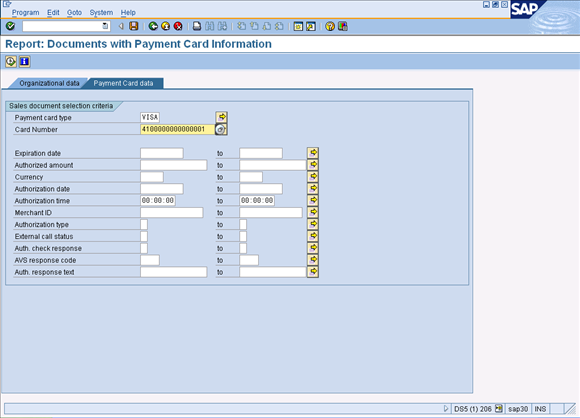
On the Payment Card data tab, enter the Payment card type and select the Card Number. If you are using XiIntercept for SAP, refer to the Token Retrieval Procedures for details.
-
To select multiple card types or multiple cards, click
 and enter the additional selections for these fields as needed.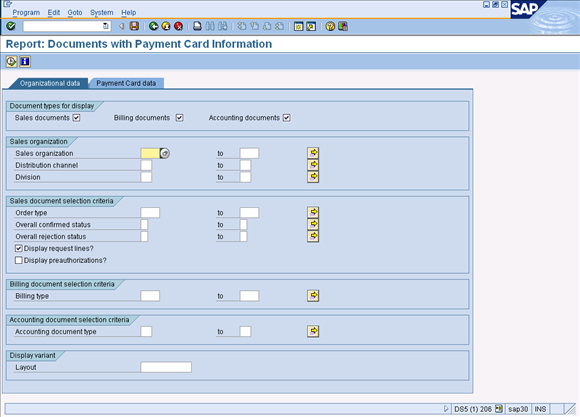
-
On the Organizational data tab, determine which types of document types to display. Only the selection criteria for the document types selected are available for input.
-
Enter the required selection criteria.
-
Click Execute.
-
Click
 to learn about the traffic lights and color coding on this report.
 -
Single-click navigation to the documents as well as the Payer and Sold-to Partner Master Records is available on this report.